Branching and Development Workflow
Branching is one of the most powerful features of Git. It allows you to create separate lines of development within a single repository. This is incredibly useful for developing new features, fixing bugs, or experimenting with code without affecting the main codebase.
Think of branches like parallel universes for your code. You can work on different features or fixes in different branches without them interfering with each other. When you're satisfied with the changes in a branch, you can merge it back into the main branch.
Show/Hide Video
Why Use Branches?
Isolation: Work on new features without breaking the main codebase
Collaboration: Multiple developers can work on different features simultaneously
Experimentation: Try new ideas without risk
Organization: Keep different types of work separate (features, bug fixes, experiments)
Creating and Switching Branches
Show/Hide Video
To create a new branch, use the git branch command:
git branch <branch-name>
This creates a new branch called <branch-name>, but you're still on your current branch. To switch to the new branch, use:
git checkout <branch-name>
You can also create and switch to a new branch in one command:
git checkout -b <branch-name>
Merging Branches
When you're ready to incorporate changes from one branch into another, you use the git merge command. However, it's important to be cautious when merging, especially when merging into your main branch.
Show/Hide Video
The command to merge a branch into your current branch is:
git merge <branch-name>
Important
Make sure that you're on the branch you want to merge into before running this command. For example, if you want to merge a feature branch into dev, first switch to dev.
Cautious Merging
When merging branches, especially into your main branch, it's a good practice to first merge the target branch into your feature branch. This helps resolve any conflicts before merging into the main branch.
This video explains the cautious merging approach:
Show/Hide Video
As shown in the video, the cautious merge approach involves:
- Switch to your feature branch (chances are you're already on it):
git checkout feature/test
- Merge the dev into your feature branch:
git merge dev
Resolve any conflicts that arise during the merge.
Switch to the dev branch:
git checkout dev
- Merge your feature branch into dev:
git merge feature/test
Using this cautious approach helps ensure that your feature branch is up-to-date with the latest changes in the target branch before merging, reducing the risk of conflicts and ensuring a smoother integration.
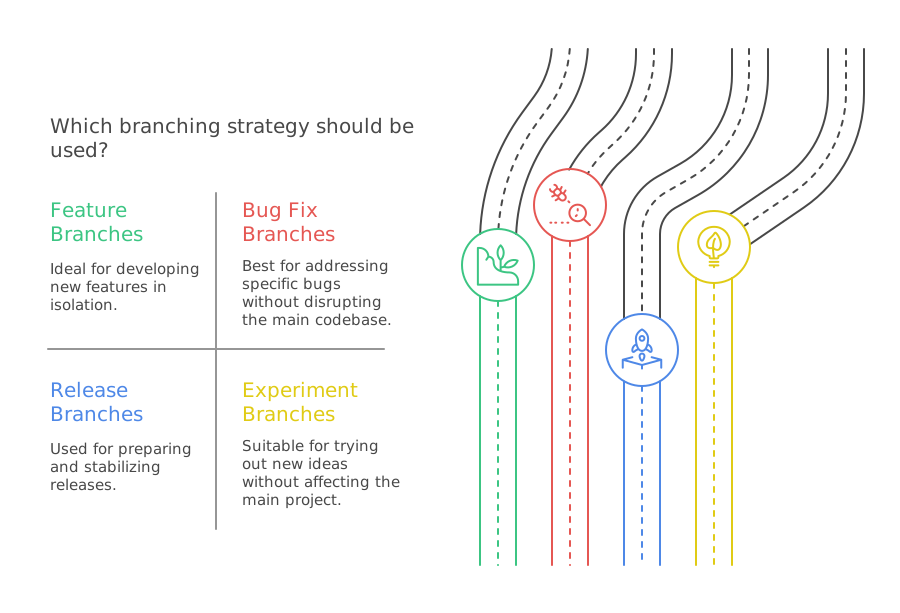
Common Branching Strategies
Feature Branches
Create a new branch for each feature you're working on:
git checkout -b feature/user-authentication
Bug Fix Branches
Create branches for bug fixes:
git checkout -b bugfix/fix-login-issue
Release Branches
Some teams use release branches for preparing releases:
git checkout -b release/v1.2.0
Experimental (or "Spike") Branches
Some developers use experimental branches for trying out new ideas:
git checkout -b experimental/new-feature
There are other branching strategies, such as:
- Hotfix Branches: For quickly addressing production issues.
- Chore Branches: For routine tasks and maintenance.
- Test Branches: For testing new features or changes.
Best Practices
Use descriptive branch names:
feature/user-loginis better thannew-stuffKeep branches focused: One feature or fix per branch
Merge or delete branches promptly: Don't let branches get stale
Test before merging: Always test your changes before merging into main branches
Use the development branch workflow: Create feature branches from dev, not master
Keep master stable: Only merge into master when ready for release
Exercise 1
Show/Hide Video
For this exercise, you will practice creating branches, making changes, and merging them back together.
Create a new project folder called
branching-practiceand initialize it as a Git repository.Create a simple HTML file called
index.html:
<!DOCTYPE html>
<html>
<head>
    <title>Branching Practice</title>
</head>
<body>
    <h1>Welcome to My Site</h1>
    <p>This is the main page.</p>
</body>
</html>
Commit your initial file to master
Create a dev branch from master:
git checkout -b dev
- Create a feature branch for adding a navigation menu (from dev):
git checkout -b feature/navigation
- Add a navigation menu to your HTML file (inside the
<body>tag, before the<h1>):
<nav>
    <ul>
        <li><a href="#home">Home</a></li>
        <li><a href="#about">About</a></li>
        <li><a href="#contact">Contact</a></li>
    </ul>
</nav>
Commit your navigation changes to the feature branch
Merge your changes back to dev using the cautious approach (merge dev into feature first, then feature into dev)
Create another feature branch for adding a footer (from dev):
git checkout dev
git checkout -b feature/footer
- Add a footer to your HTML file (before the closing
</body>tag):
<footer>
<p>© 2025 My Website. All rights reserved.</p>
</footer>
Commit your changes
Merge the footer changes back to dev using the cautious approach
Finally, merge dev into master when everything is stable:
git checkout master
git merge dev
Hints
How do I create a feature branch from dev?
First make sure you're on the dev branch, then create the feature branch:
git checkout dev
git checkout -b feature/branch-name
How do I do the cautious merge approach?
To merge a feature branch into dev:
- First merge dev into your feature branch:
git checkout feature/branch-name
git merge dev
- Resolve any conflicts, then merge feature into dev:
git checkout dev
git merge feature/branch-name
Submission
Once you have completed the exercise, run git log --oneline to see your commit history. Copy the output and paste it into the text area below.
Solution
Show the Answer
Your git log output should look something like this:
a1b2c3d Merge branch 'dev' (final merge to master)
e4f5g6h Add footer
i7j8k9l Add navigation menu
m1n2o3p Create dev branch
p4q5r6s Initial commit with basic HTML
The exact commit hashes will be different, but you should see the progression showing:
Initial commit on master
Development work on dev and feature branches
Final merge from dev to master
Your final HTML file should look like this:
<!DOCTYPE html>
<html>
<head>
<title>Branching Practice</title>
</head>
<body>
<nav>
<ul>
<li><a href="#home">Home</a></li>
<li><a href="#about">About</a></li>
<li><a href="#contact">Contact</a></li>
</ul>
</nav>
<h1>Welcome to My Site</h1>
<p>This is the main page.</p>
<footer>
<p>© 2025 My Website. All rights reserved.</p>
</footer>
</body>
</html>